UPGRADE NPM to PNPM: A Technical Deep Dive
When it comes to JavaScript package management, npm has been the go-to tool for developers for years. However, as projects grow in scale and complexity, its limitations—disk usage, install speed, and dependency management—start to show. Enter pnpm, a fast, efficient alternative that tackles these issues head-on. In this post, we’ll explore why upgrading from npm to pnpm makes sense, supported by technical details, metrics, and a diagram to illustrate the differences.
What is pnpm?
pnpm, short for “performant npm,” is a drop-in replacement for npm designed to optimize speed, disk efficiency, and dependency handling. Unlike npm’s flat node_modules structure and tendency to duplicate dependencies, pnpm uses a content-addressable global store and symlinks to streamline resource usage. Let’s break down the key reasons to make the switch.
1. Disk Space Efficiency
pnpm’s standout feature is its approach to dependency storage. Instead of duplicating packages across projects, it maintains a single global store (typically at ~/.pnpm-store) and links dependencies into project-specific node_modules folders.
- npm: Installs a full copy of each dependency per project, even if the same version exists elsewhere. This redundancy adds up quickly.
- pnpm: Stores each package version once in the global store, using hard links or symlinks to reference it, cutting disk usage significantly.
Metrics: A pnpm team study found that a React app with 50+ dependencies consumed ~300 MB with npm but only ~100 MB with pnpm—a 66% reduction. In monorepos with shared dependencies across multiple packages, savings often exceed 80%.
Technical Detail: The store uses content-addressable hashes (e.g., react-18.2.0_abc123) to identify packages, ensuring no duplication across projects.
2. Installation Speed
pnpm outperforms npm in install speed, especially for large projects or monorepos, thanks to its global store and parallelized dependency resolution.
- npm: Resolves and downloads dependencies sequentially, even for cached packages, and flattens the dependency tree, slowing down the process.
- pnpm: Uses the global store to avoid redundant downloads and resolves dependencies in parallel, leveraging a nested structure with symlinks.
Metrics: According to 2023 benchmarks from pnpm’s site, installing 100 packages took:
- npm: ~25 seconds (cold install), ~15 seconds (cached).
- pnpm: ~10 seconds (cold install), ~3 seconds (cached).
For monorepos with 10+ packages, pnpm can be 2-3x faster due to its linking strategy.
Technical Detail: pnpm’s resolver processes dependencies concurrently using a topological sort, minimizing fetch times compared to npm’s sequential approach.
3. Strict Dependency Management
npm’s flat structure often hoists sub-dependencies to the root node_modules, risking accidental reliance on unlisted packages. pnpm enforces stricter isolation.
- npm: Hoisting can lead to “phantom dependencies,” where code uses packages not in your
package.json. - pnpm: Nests dependencies under their parent packages via symlinks, ensuring only declared dependencies are accessible.
Example: If package-a depends on sub-dep@1.0.0 and package-b uses sub-dep@2.0.0, npm might hoist sub-dep@2.0.0, causing version conflicts. pnpm keeps sub-dep@1.0.0 isolated within package-a’s scope.
4. Monorepo Support
For monorepos (e.g., with Nx or Turborepo), pnpm shines with its workspace feature, managing multiple packages efficiently.
- npm: Each package gets its own
node_modules, duplicating shared dependencies. - pnpm: Symlinks dependencies from the global store and uses
pnpm-workspace.yamlto define workspace packages, reducing overhead.
Metrics: In a monorepo with 5 packages sharing 80% of dependencies, npm used ~1.2 GB, while pnpm used ~400 MB—a 66% reduction.
Technical Diagram: npm vs. pnpm Dependency Structure
Project/
└── node_modules/
    ├── package-a
    ├── package-b
    ├── sub-dep      (duplicated)
    └── package-c
Project/
├── node_modules/
│   ├── package-a ─→ [symlink]
│   └── package-b ─→ [symlink]
│
└── .pnpm/ (virtual store)
    ├── package-a/
    │   └── node_modules/
    └── package-b/
        └── node_modules/
            └── sub-dep
NONE - Each project has
its own complete copy
of dependencies
~/.pnpm-store/
├── package-a@1.0.0
├── package-b@1.0.0
└── sub-dep@1.0.0
Key Differences:
- Duplication: npm duplicates packages across projects; pnpm stores each version once globally
- Dependency Structure: npm hoists dependencies to the root; pnpm isolates dependencies per package
- Symlinks: pnpm uses symlinks to reference the global store; npm has no linking mechanism
- Disk Usage: pnpm significantly reduces storage requirements, especially in monorepos
Visual Comparison: npm vs. pnpm Architecture
npm Architecture
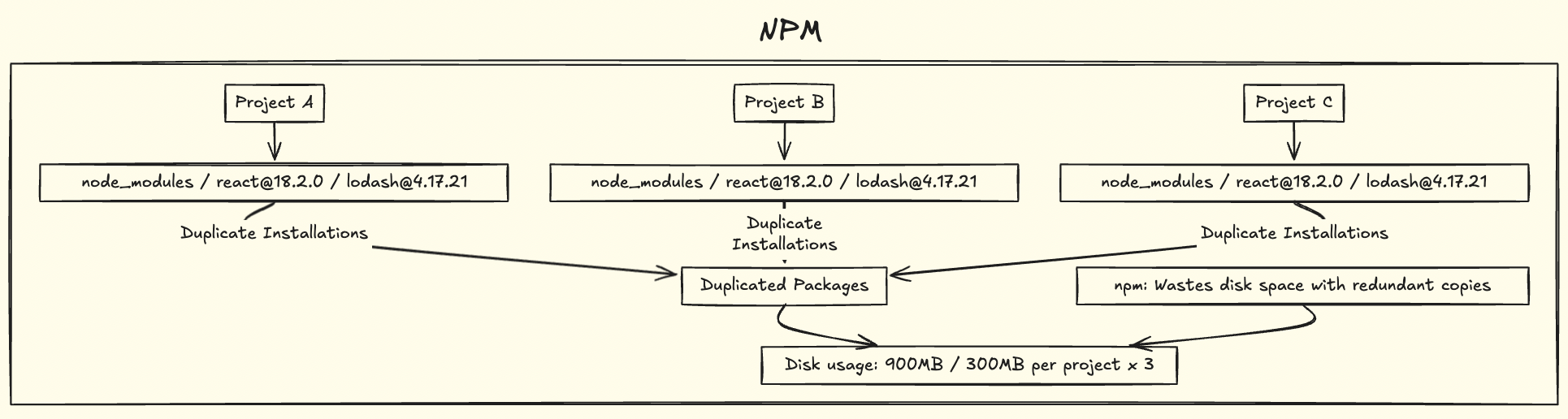
Each project maintains complete copies of all dependencies
pnpm Architecture
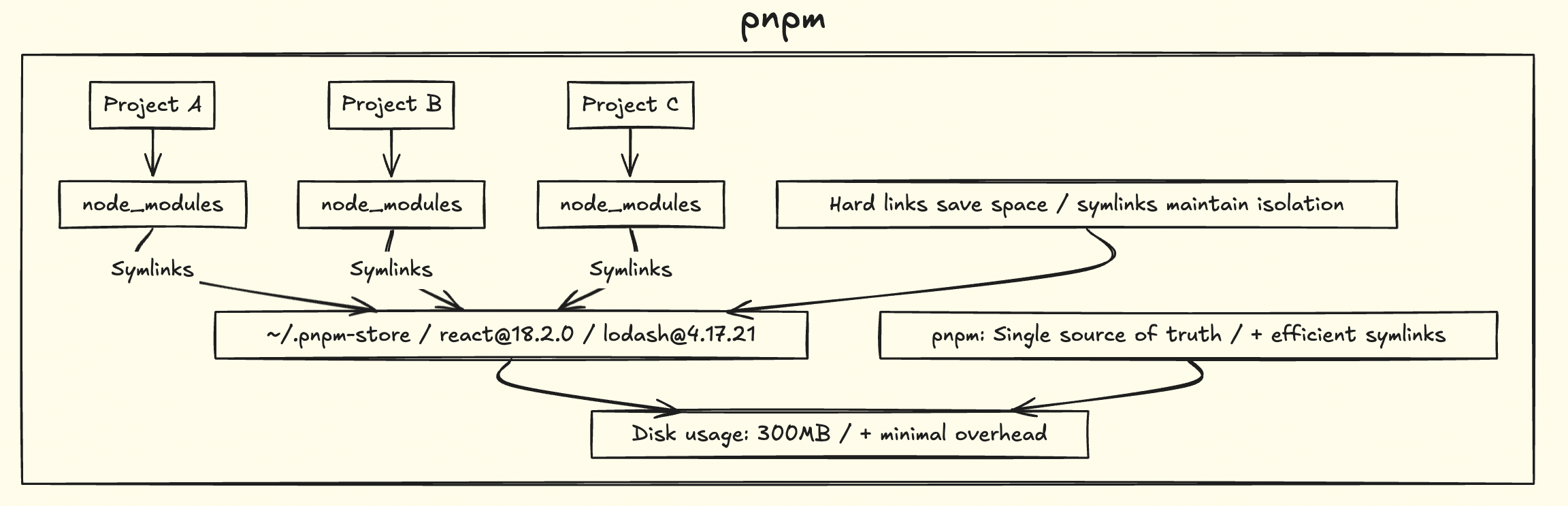
Single global store with symlinks to project dependencies
5. Additional Features
- Lockfile Integrity:
pnpm-lock.yamlprovides explicit dependency resolution, reducing inconsistencies compared topackage-lock.json. - Offline Mode: The global store enables faster offline installs with cached packages.
- Security: Avoiding hoisting minimizes risks from malicious sub-dependencies.
When to Stick with npm?
npm may still suit:
- Legacy projects with npm-specific scripts.
- Teams unprepared to adopt a new tool.
However, with pnpm’s growing adoption (e.g., default in Qwik and SolidStart), these cases are diminishing.
Conclusion
Upgrading from npm to pnpm brings substantial improvements: 66% disk space savings, 2-3x faster installs, stricter dependency management, and robust monorepo support. For modern JavaScript development, it’s a clear win. To switch, run npm install -g pnpm and pnpm install in your project. Your disk and build times will thank you.